Home / Platform

Fewer incidents, with less manual work for your safety team

Invigilo SafeSuite is AI video analytics and safety management software. It takes over the watching, chasing and reporting, so your team spends its time fixing hazards. Five layers on the cameras a site already runs: Detect, Understand, Respond, Insights and Predict, with Permit alongside.

Layer 1Detection and camera rounds

Detect

Hazards flagged in about a second, without anyone watching monitors.

SafeKey runs models covering 45 risk types at the edge and flags serious injury precursors as they appear. Alerts reach WhatsApp, Teams, Telegram and email in about a second, with the frame, camera and time attached. Camera rounds also run at unscheduled times on every camera, every shift, and each round ends in a written report.

  • 95% recall and 80 to 90% accuracy, tuned per site and per risk type
  • Unscheduled camera rounds, so crews cannot time their shortcuts, with offline cameras flagged
  • Any IP camera over RTSP or ONVIF, plus PTZ, body camera, phone and drone footage
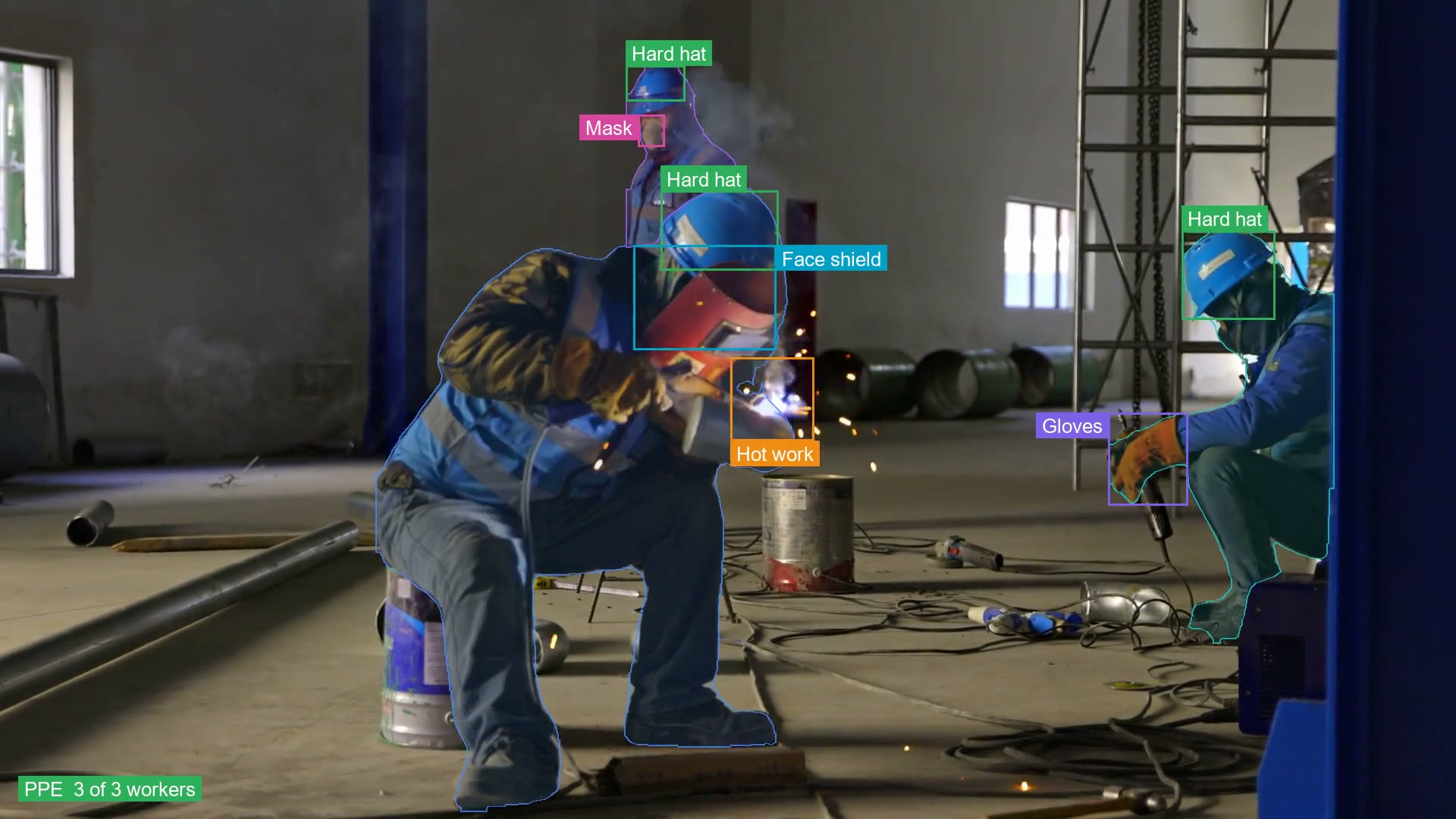
Three welders in a workshop with hard hat, face shield, mask and gloves each boxed, and the welding arc marked as hot work
PPE and hot work detection. Illustration on stock footage.

Layer 2Scene understanding

Understand

It reads the scene the way a safety officer would.

Detection says what is in the frame. Understanding says whether the work is safe. Our own safety vision language model, built on an open base and trained on five years of our critical risk data, reads the context around each finding: where the load is, who is inside the zone and what the crew is doing.

  • Context checked before an alert, such as whether the machine is moving
  • Every finding described in plain language, with a recommendation
  • Fewer false alarms, so alerts get acted on
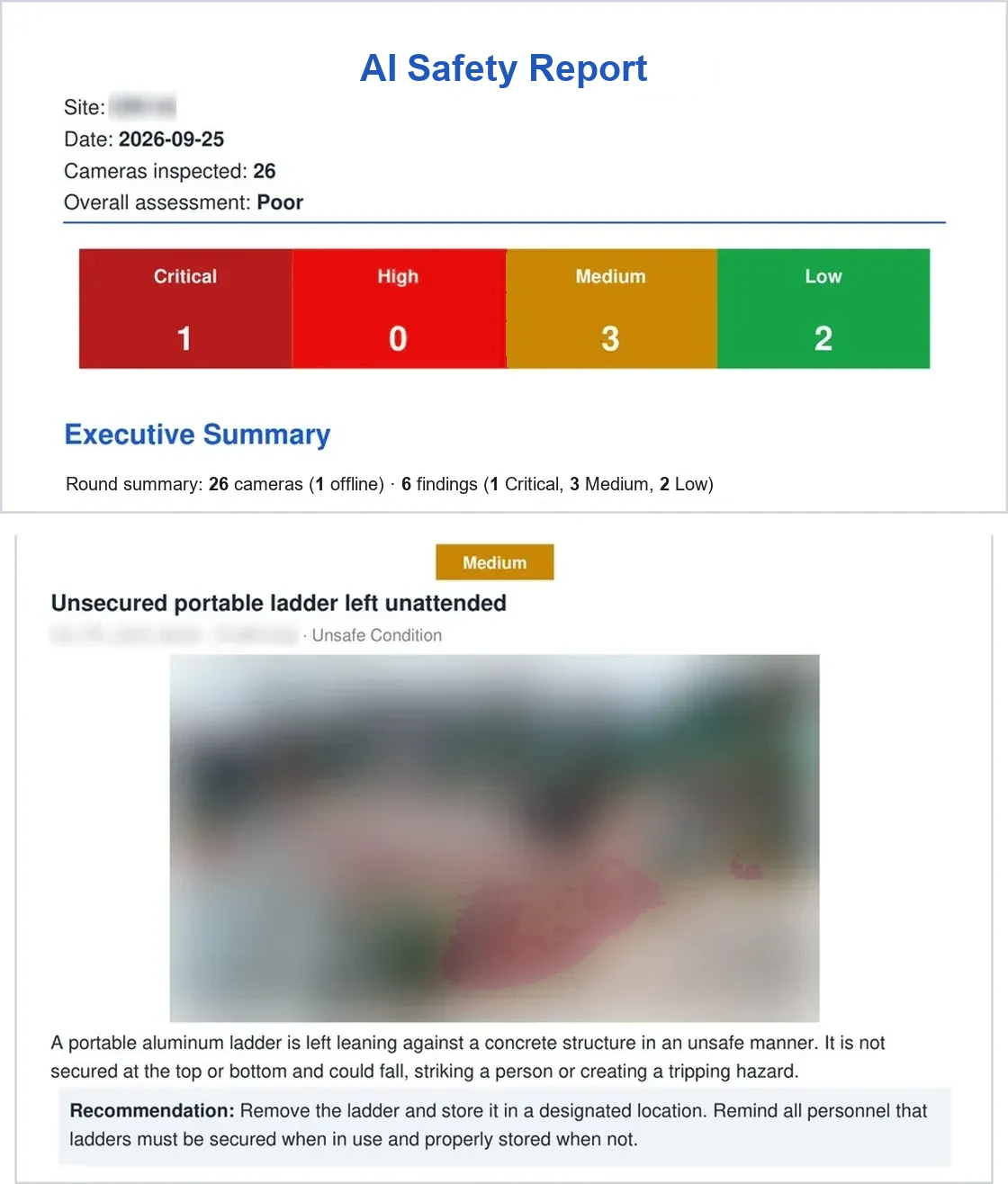
Written findings by severity, each with a recommendation
Written findings from a camera round. Site details blurred.

Layer 3Corrective actions and investigations

Respond

No corrective action left open.

Each violation becomes a case with an owner and a deadline. Every incident and near miss gets a draft investigation, with 5-Why, fishbone and root cause classification, for your HSE team to review and approve. Overdue cases escalate, and closure is checked on the camera that raised it.

  • Every open action has an owner, a deadline and a recorded root cause
  • Hazard and incident investigations drafted for review, not written from scratch
  • Escalation fires on time, by itself, along the chain you set per site
  • Closure proven on camera, frame attached
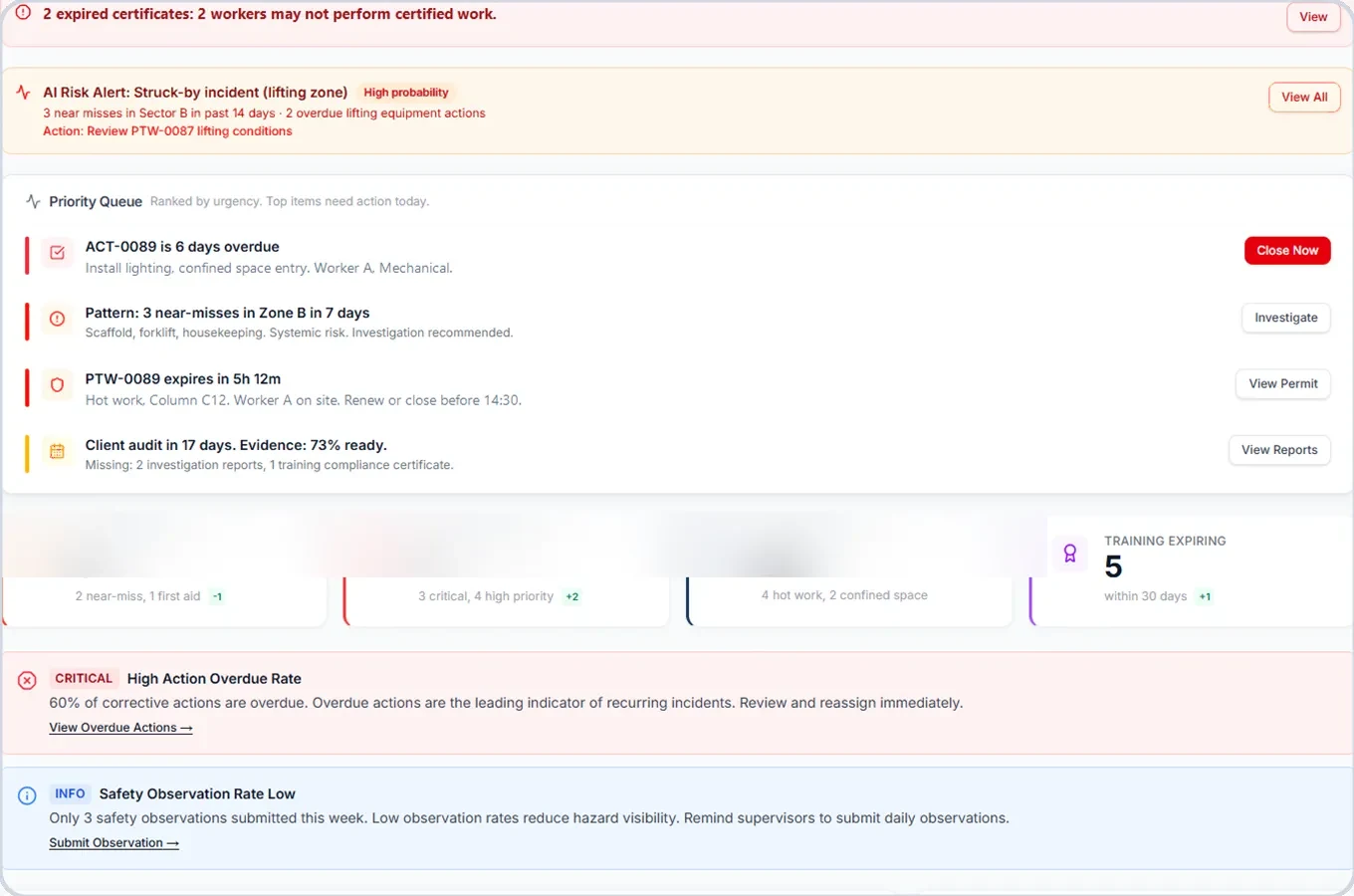
Corrective action queue with priorities and overdue actions
Corrective action queue in the dashboard.

Layer 4Analytics, leading indicators

Insights

See which zone is getting worse before an incident.

Risk scores move with live detections. Patterns across shifts and zones surface before they become incidents, and HSE leadership gets a weekly brief written by the system from what happened on the floor.

  • Leading indicators by zone, shift and risk type
  • A weekly brief for leadership, written by the system
  • Power BI, webhooks and open APIs for your own dashboards
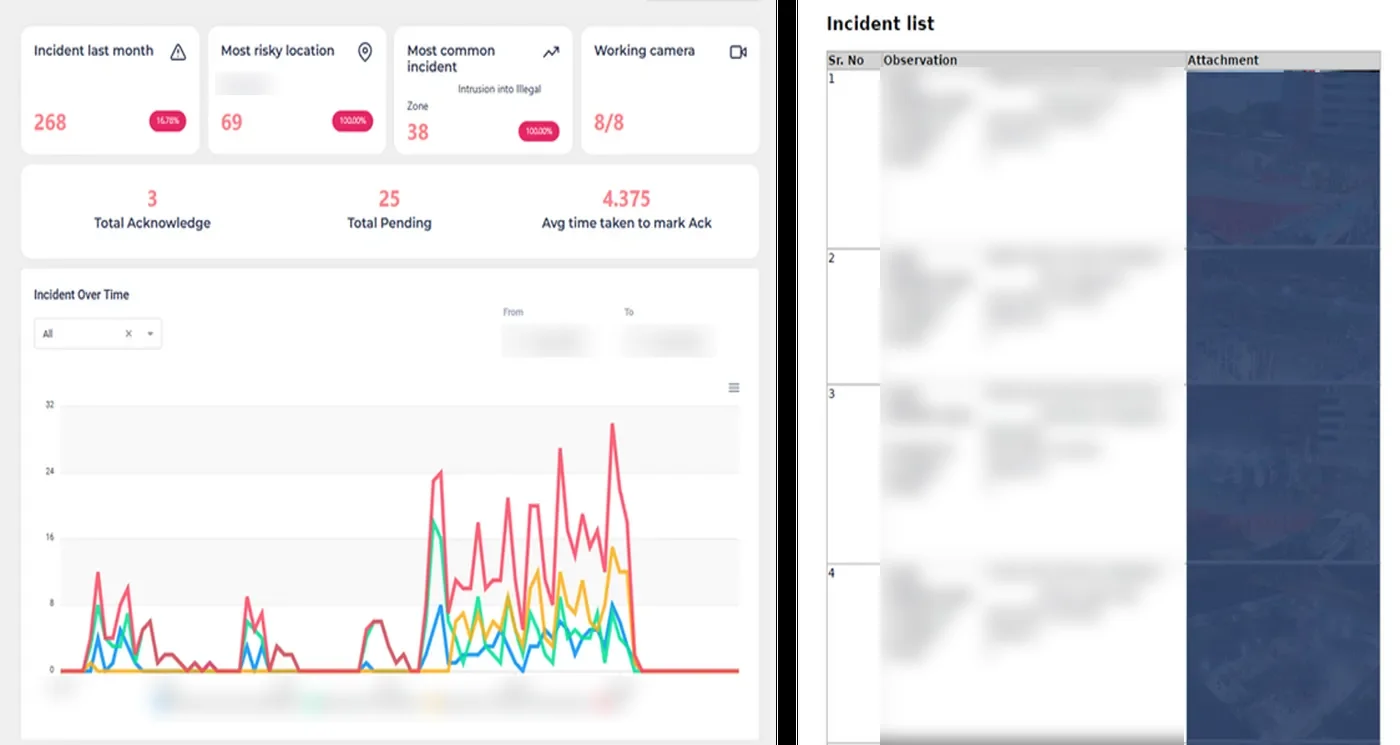
Incident trends and observation list in the dashboard
Trends and observations in the dashboard.

Layer 5Forecasts and briefings

Predict

Next week's risk, forecast from the site's own history.

Trends by zone, crew and activity become a forecast of where risk rises next, with a written report and recommendations to prevent the next accident. The forecast and the last shift's detections become the morning toolbox talk, per zone and per crew.

  • Risk forecast by zone for the week ahead
  • Toolbox talks built from real detections on this site
  • Procedures and job safety analyses generated the same way

Toolbox talk, Zone B, morning shift

Red zone discipline around live machinery

  1. What the cameras sawRed zone entries while the machine was moving, over the last two shifts.
  2. Why it mattersThe exclusion zone moves with the equipment. Standing just outside the painted line is still inside the swing.
  3. What we do todayWait for the operator's signal before entering. Barrier restored at the north access.

Generated from detections. Shown for illustration, with example content.

Beside the five layersPermit to work

Invigilo Permit

Permits tied to live camera zones.

A digital permit is linked to the camera zone it covers. The camera checks the controls named in the permit that it can see, such as barriers and a fire watch, and flags gaps to the permit owner.

  • Each permit linked to its camera zone
  • Gaps flagged to the permit owner, who decides when work starts
Hot work permit checked on camera. Illustration on stock footage.

Fewer false alarms, so alerts get acted on

An alert is only useful if people trust it. Each detection is checked against the scene first.

  1. Context

    Is the machine moving?

    Proximity alerts are keyed to whether the plant is in motion, so a parked excavator does not raise one.

  2. Zone

    Is the person inside the zone, and for how long?

    Zones are drawn with your safety team and set per camera, per shift and per phase of work.

  3. Review

    Your team marks each finding

    Inaccurate findings are fed back and retrain the models.

No new systems for your team to learn

No new cameras. The findings go where your teams already work.

Cameras

  • Any IP camera over RTSP or ONVIF
  • PTZ cameras
  • Body camera and phone footage
  • Drone feeds alongside CCTV

Alerts

  • WhatsApp
  • Microsoft Teams
  • Telegram
  • Email and the dashboard

EHS systems

  • DoneSafe
  • Other EHS systems through webhooks and open APIs

Reporting

  • Power BI
  • PDF and Excel audit reports
  • Webhooks
  • Open APIs

45 risk types covered, plus custom detections for your site

Each detection is tuned to your rules and switched on per camera. New detections reach every site as the model library grows.

PPE compliance

  • Helmet
  • Hi-vis vest
  • Harness
  • Gloves and goggles

Zones and access

  • Restricted and red zone entry
  • Missing barricades and guardrails
  • Person limit per zone
  • Missing signage

Work at height

  • Harness worn or not worn
  • Hook attached or unattached
  • Missing scaffold guardrails and toe boards
  • Three-point contact when climbing

Vehicles and plant

  • Forklift and machinery overspeed
  • Proximity to moving machinery
  • Collision path
  • Vehicle moving without a traffic controller

Line of fire

  • Person under a suspended load
  • Machinery in motion near people
  • Person timer inside a zone
  • Man overboard, offshore

Behaviour and ergonomics

  • Fallen person, slip, trip and fall
  • Lone worker
  • Poor lifting posture
  • Jumping across ledges

Fire and environment

  • Smoke and fire
  • Stagnant water
  • Workers in direct sun beyond set limits
  • Overflowing bins

Housekeeping and operations

  • Poor housekeeping
  • Obstructed pathway
  • Over-stacking and improper storage
  • Camera tampering

Common questions

Will it work with the cameras we already have?

Yes. Invigilo connects to any IP camera that streams over RTSP or ONVIF, plus PTZ, body camera, phone and drone footage. Standard deployments need no new cameras.

How accurate is the detection?

95% recall and 80 to 90% accuracy, tuned per site and per risk type. In a pilot it is measured on your own footage, against success measures agreed before go-live.

How long does deployment take?

First alerts arrive within 48 hours of connecting your cameras. Zones and thresholds are then tuned with your safety team over the first weeks.

How do alerts reach the team?

Alerts reach WhatsApp, Microsoft Teams, Telegram and email in about a second, with the frame, camera and time attached. Each one is assigned to a named person and closes when the camera confirms the fix.

Where is our video processed and stored?

On a server in your site office or in the cloud, chosen site by site. With a site server, only events leave the site. Invigilo is an ISO/IEC 27001:2022 certified company.

What are the five layers?

Detect flags hazards on camera. Understand reads the scene in context. Respond investigates root causes and assigns and verifies each corrective action. Insights ranks risk by zone, crew and shift. Predict forecasts where risk is rising and builds the toolbox talk. Permit to work runs alongside.

Talk to our team

Questions, pricing, a pilot, or a free footage review on your own cameras. Tell us what you need and we come back with next steps.

Request received. We will reply within one business day.
Something went wrong. Email us directly at sales@invigilo.sg